MAIN ITEM GROUPS
Page contents
CMDB hierarchy
Configuration Item Main groups are the main groups of configurable items. In the hierarchy of the configuration database they sit at its very top:
- Item main groups (for example Devices, Locations, Vehicles…), which are further divided into subgroups. More in the article below
- Item types – division of main groups into subgroups that distinguish sets of items with the same properties (for example, the main group of the IT devices category may contain the subgroups computers, printers, servers, network elements…). More in the separate article Item types
- Item list – contains the objects themselves, sorted into subgroups (for example, specific devices from the computers subgroup). More in the separate article Item list
- Item types – division of main groups into subgroups that distinguish sets of items with the same properties (for example, the main group of the IT devices category may contain the subgroups computers, printers, servers, network elements…). More in the separate article Item types
You can display the list of defined main groups using the main menu CMDB -> Item main groups. If you are just getting started with CDESK, the list of groups will probably be empty and you will first need to define the main groups for the selected categories.
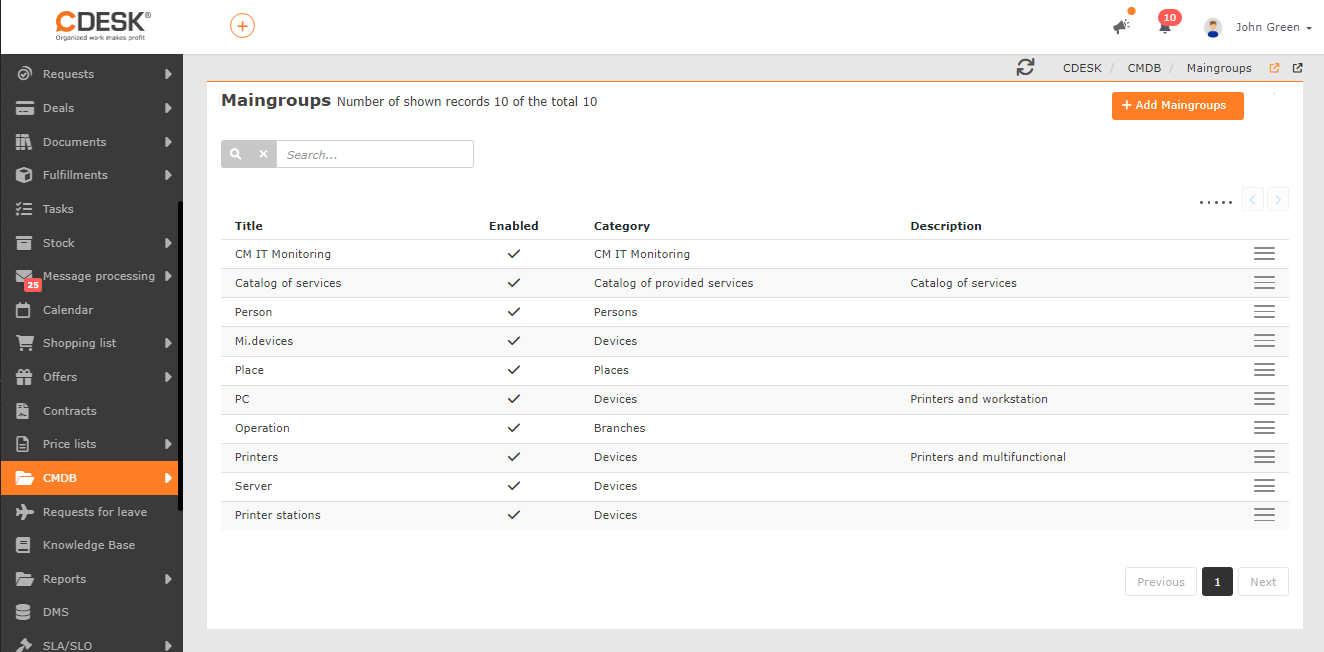
Main group categories
Every main group belongs to one of the categories:
- Devices – used for keeping records of devices; it can be defined several times for different device categories (for example for IT devices, machine tools, air-conditioning units…)
- Locations – defining a group of this category is required for keeping records of the customer’s locations, which at the same time makes it possible to assign locations to requests, fulfilments and items. A group of the Locations category can be defined at most once
- Branches – defining a group of this category is required for keeping records of the customer’s branches, which at the same time makes it possible to assign branches to requests and items. A group of the Branches category can be defined at most once
- Catalogue of operated services – a group of this category can be defined at most once. Individual items can be created automatically from contracts, or manually
- General category – is treated the same as the Devices category, and is suitable for recording objects that cannot be classified under the other categories (for example licences, swimming pools); it can also be defined several times
- Consumables – a group of this category cannot be created manually. This module is still under development, the details will be added once it is finished
- People – used for keeping records of people; it can be defined at most once
- Vehicles – used for keeping records of vehicles; it can be defined at most once
- IT Monitoring – a group of this category cannot be defined manually. It becomes available after enabling the CM IT Monitoring functionality in the Global settings and can be defined at most once. The objects of this group are computers and servers registered in Customer Monitor, added automatically after registration in CM, as well as other devices on the network or connected to these computers
The individual categories also differ from one another in the availability of options and settings for items, according to the following table:
|
Main group category: |
SLA |
Links |
Hierarchy |
Regular requests |
History |
Other |
| Devices |
• |
• |
• |
• |
• |
|
| Locations |
• |
• |
• |
• |
• |
Transport location |
| Branches |
• |
• |
• |
• |
• |
Locations |
| Catalogue of operated services |
• |
• |
• |
• |
• |
Contract |
| General category |
• |
• |
• |
• |
• |
|
| Consumables |
|
• |
|
|
• |
Devices |
| People |
• |
• |
|
• |
• |
|
| Vehicles |
• |
• |
|
• |
• |
|
| IT monitoring |
• |
• |
• |
• |
• |
Zones |
You can read more about the individual object settings of the individual categories in the article CI list.
Defining a main group
Some CDESK functions refer to the CMDB and will not be usable until you have defined the necessary groups. If you do not yet have the relevant group defined, you can create a new group using the +Add group button in CMDB -> Item main groups. You can edit an existing group by double-clicking the relevant row, or by selecting  Edit from the context menu.
Fill in the following in the form:
Category – select from among the categories. The individual categories have their own specifics, which are listed in the Main group categories paragraph above
Enabled – if you do not want the group and its objects to be offered in selections, set the switch to the off position 
Name – enter a name for the item group
Description – you can enter a description of the group, which will appear in the CI Main groups list
Slug (alias) – an alias for the ID – it allows you to work with main groups in the CDESK API interface without needing to know their ID in the database. Use expressions without diacritics and spaces – use a hyphen instead of spaces. The slug should be unique, i.e. it may be used at most once within the main groups
Enable archiving – for all objects assigned under the group, the archiving option becomes available – i.e. it makes it possible to “delete” an object from the CMDB without losing its history
Depending on the selected category, further options are available:
Link to branch – off/optional/mandatory – the option becomes available if a main group of the Branches category is defined. Enabling the option will make it possible/required to assign a branch to every item of the Devices, General category, IT Monitoring, Locations (mandatory), Catalogue of operated services, People, Vehicles category
Link to owner – off/optional/mandatory – Enabling the option will let you select an owner from the offered list for main groups of the Devices, IT Monitoring, General category, Catalogue of operated services categories
Link to IT service manager – off/optional/mandatory – Enabling the option will let you select an IT service manager from the offered list for main groups of the Catalogue of operated services category
Link to business guarantor – off/optional/mandatory – Enabling the option will let you select a business guarantor from the offered list for main groups of the Catalogue of operated services category
Link to technical guarantor – off/optional/mandatory – Enabling the option will let you select a technical guarantor from the offered list for main groups of the Catalogue of operated services category
Link to key user – off/optional/mandatory – Enabling the option will let you select a key user from the offered list for main groups of the Catalogue of operated services category
Link to location – off/optional/mandatory – the option becomes available if a main group of the Locations category is defined. Enabling the option will make it possible/required to assign a location to every item of the Devices, General category, IT Monitoring category
Link to administrative assignee – off/optional/mandatory – Enabling the option will let you select an administrative assignee from the offered list for main groups of the Devices, Locations, Branches, IT Monitoring, General category, Catalogue of operated services, People, Vehicles categories
Link to technical assignee – off/optional/mandatory – Enabling the option will let you select a technical assignee from the offered list for main groups of the Devices, Locations, Branches, IT Monitoring, General category, Catalogue of operated services, People, Vehicles categories
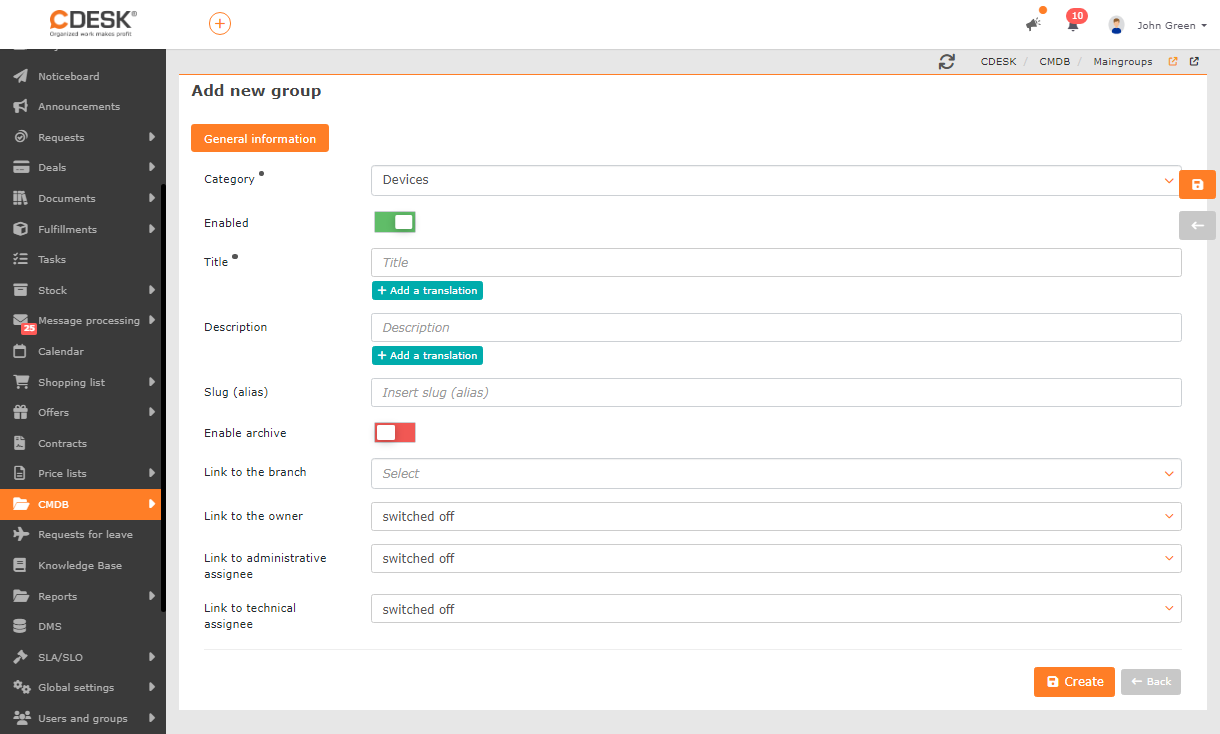
To create the group, or to save the changes you have made, click Create/Save.
When a new main group is saved, a general subgroup (Item type) is automatically created, which can be edited or supplemented with further subgroups on the Item types tab. You can read more about subgroups and working with them in the separate article Item types.